
Loader
Library
The three library layouts, the badges on a game, the details page, and the + menu.
On this page
The loader reads each game’s manifest.json from games/<id>/ and shows up to 64 games. Folders whose names start with a dot, or are 64 bytes or longer, are skipped.
Layouts
Choose one on the Layout page. The choice is saved in config/loader.json.
| Layout | What it shows |
|---|---|
| Row (default) | Like the Switch HOME menu: one line of 220×330 portrait covers that scrolls sideways. The focused cover is 12 % bigger; below the row are its title, status, Ren’Py version, runtime, and the reason it cannot start (or its number of performance issues). |
| Grid | Five covers per row with their titles, scrolling up and down. Quick to scan a long list. |
| Cinematic | The focused game’s own menu art fills the screen, darkened toward the text and the row. A big title, its tags, and one line of covers along the bottom. Games without art get a dark glow in their cover’s main colour. |
In every layout:
- a red
!on a cover means the game cannot start; - an amber
!means Switch performance issues; - the header shows the game count, Handheld or Docked, and an amber Applet mode chip when you are not in full-memory mode;
- red or amber banners appear for a read-only SD folder, or a controller file loaded from its backup.
The row and the grid stop at their edges. The library keeps the focused game when you come back from its details.
Game details
Press A on a cover. The page sits over the game’s menu art (else its cover), faded and dark toward the bottom, and shows:
- a big cover, the title and folder name;
- the Ren’Py version, status, runtime, and whether that runtime is installed;
- notes for Ren’Py 7 games that were recompiled, the reason a game cannot start, and up to three performance issues. These scroll with up/down when they run long.
The buttons are always at the bottom right: Change picture, Controls for this game, then Launch with a play icon, or Can’t launch when there is a problem.
The loader refuses unsupported games, games whose runtime is missing, and folders without a game/ subfolder. A game copied by hand without a manifest uses the default runtime.
The + menu
Press + on the library. A panel slides in from the right:
- Controller settings: see Controller settings;
- Controller test: the buttons laid out as on the controller, lit while pressed;
- Layout: the library layout, the backgrounds and the accent colour;
- How to play: the illustrated guide shown on the first start;
- Diagnostics: see Diagnostics;
- Exit to the Homebrew Menu.
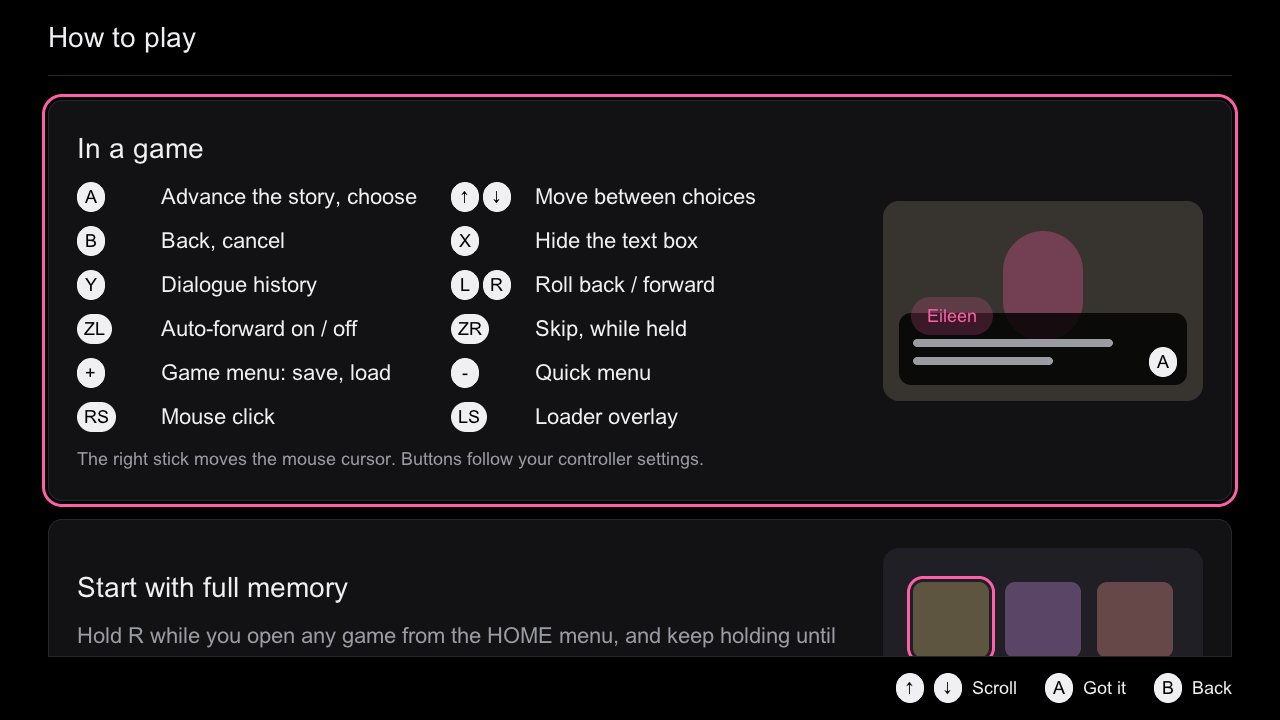
How to play has five cards: the buttons in a game (from your current mapping), starting with full memory, adding games, the + menu, and the emergency combo. A or B closes it. config/loader.json remembers that it was seen ("help_seen": true).
Touch
Everything works by touch too. Dragging scrolls every list and row; a tap on an item focuses and confirms it, like A; a tap on a footer hint does that hint’s action; a tap beside the + menu or a notice closes it.
note
Touch in the loader is implemented and tested on the Mac (tests/ui/mockups.c checks taps on Launch and the Back hint), but touch has no hardware result yet.