
Loader
Diagnostics
Check the launch mode, memory, SD folder, controller file and runtime, read the recent log, and run the Python self-test.
On this page
Open it from the + menu: Diagnostics.
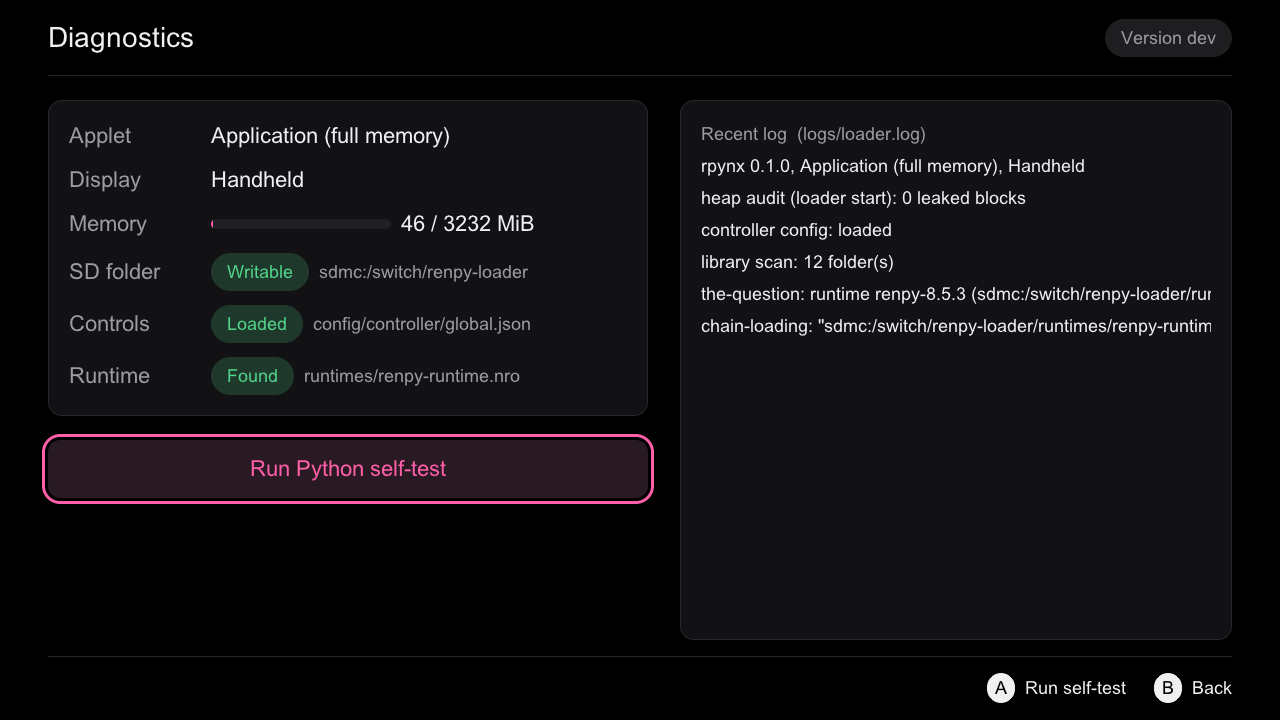
What it shows
| Row | What to look for |
|---|---|
| Applet | Application (full memory) is what games need. Anything else is applet mode. |
| Display | Handheld or Docked. |
| Memory | Used and total MiB. |
| SD folder | Writable. If not, the loader keeps running but cannot save settings. |
| Controls | Loaded, or a note that the backup or the defaults were used. |
| Runtime | Found, with its path under runtimes/. |
On the right is the end of logs/loader.log.
Python self-test
Press A on Run Python self-test. The loader starts the runtime, which runs the self-test and prints a PASS or FAIL line per check, then returns to the loader when you press +. The report is saved to cache/python-selftest.txt.
On a Switch it finishes in about 2 s with 66/66 required imports, threads and os.urandom (runs 4 and 20). One check fails, and is expected to: non-ASCII file names on sdmc: (see Non-ASCII file names).
The self-test runs in applet mode too. It needs the loader to be started from the Homebrew Menu, because chain-loading goes through the Homebrew loader.
note
The self-test prints from a second thread, and the libnx console is not thread-safe, so its text may tear. That is cosmetic.